
Precip – Rain Totals & Weather
Precipitation Inc.Weather
4.61.02K Reviews
- Version
- 4.8.3
- Installs
- 100.00K
- Age Rating
- Everyone
Screenshots
Our Review of Precip – Rain Totals & Weather
 Analysis by Appyee
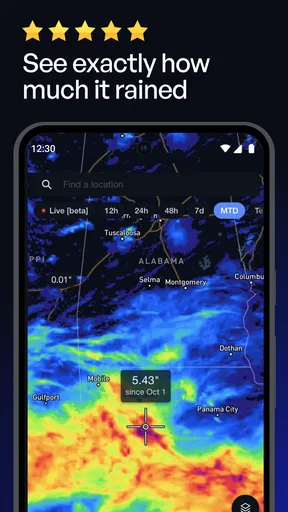
My first useful habit with Precip – Rain, Snow & Weather is to check the map before I decide whether a forecast matters to my exact plans. A general weather app can tell me that rain is expected in town; this one is built around looking at precipitation totals for a pinpoint on a map. That distinction is handy when one neighborhood, trailhead, or side of a commute may get a different dose of weather from another.
Why a map-first routine helps
I would use Precip as a focused companion rather than assume it replaces every kind of forecast. If I’m choosing when to walk the dog, start a garden task, or head out for a bike ride, I can check the place I’m actually going instead of relying only on conditions near home. The practical benefit is not a promise that every reading will be perfect; it is a more specific way to frame the question: how much rain or snow is expected at this spot?
That approach also makes the app useful for people whose plans cross local boundaries. A commute, a delivery route, or a drive to a nearby town can pass through pockets of weather that a single city-level forecast smooths over. I’d compare the relevant points on the map before leaving, especially when precipitation is the deciding factor. For broad questions such as temperature through the week or a general outlook for a holiday, a conventional forecast screen may be quicker.
A repeatable check for ordinary days
My simple routine would be to check the destination first, then compare it with the starting point, and finally check again close to departure if rain or snow could change the plan. That is more useful than repeatedly opening the app without a decision in mind. If both locations look similar, I can stop checking and get on with the day; if they differ, I can allow extra time or pick another window.
For example, imagine I’m planning to take a child to an outdoor practice after work. The morning forecast may look fine, but the relevant question is whether precipitation is likely around the field at the time we’ll arrive. I’d use the location-focused map to make that check, then keep a backup plan ready rather than treating a forecast as a guarantee. This is a modest workflow, but it turns a weather glance into a practical decision.
Settings that deserve a quick look
Units are worth checking early. If a forecast uses measurements I don’t naturally think in, I’m more likely to misread it or make a poor comparison. I’d set metric or imperial units to match what I use in daily life, then review notification preferences so alerts are useful rather than constant background noise. Customization is most valuable when it reduces friction: choose the information and notices that help with your routine, not every option just because it exists.
Location is another small but consequential detail. A map-based weather check is only useful if I’m looking at the right place, so I would verify the point before making plans for a destination outside my usual area. When moving between places, it’s easy to assume the app is showing the location I have in mind. Taking a moment to confirm the map position is a better safeguard than trusting a familiar-looking forecast at a glance.
Precip is a free weather app from Precipitation Inc., with optional in-app purchases listed from $14.99 to $369.99 per item. The free starting point makes it easy to try the location-based approach, while the wide range of purchase prices is a reason to inspect any paid option carefully before committing. The app is rated for Everyone and runs on Android 6.0 or later. It has a 4.4 average from around 2.6 thousand ratings, and more than 100 thousand installs. Those figures suggest a real user base, but I’d still judge it by whether its map answers the weather questions I actually have.
The Interface: Simplicity Meets Functionality
First up, let’s talk about the app's interface. Precip – Rain, Snow & Weather keeps things super clean and straightforward. When you open it, you’re greeted with a minimalist design that doesn’t bombard you with too much info at once. It’s all about getting you the essentials quickly. I’m a fan of the way it uses colors to indicate different weather conditions—blue for rain, white for snow, and so on. It’s intuitive and easy on the eyes.
Navigation is a breeze, literally. You can swipe through the different sections like the hourly forecast, weekly forecast, and live radar maps. It’s all right there at your fingertips, making it easy to plan your day or week, especially if you’re someone who loves to be outdoors.
The Features: More Than Just a Forecast
Now, let’s dive into the features because that’s where Precip really shines. The app provides real-time updates on weather conditions, which is crucial if you want to avoid getting drenched. It’s got hyper-local weather forecasts too, thanks to its use of advanced weather models and crowd-sourced data. So, whether you’re in New York City or a small town in the middle of nowhere, you’re covered.
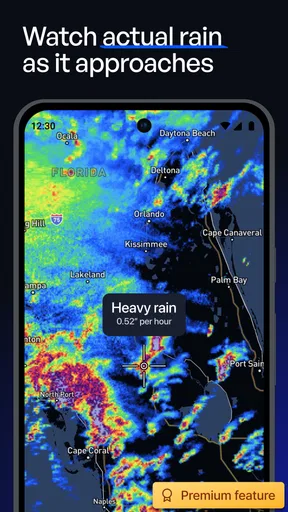
The radar feature is quite impressive. You can see precipitation patterns moving in real-time, and it’s surprisingly accurate. I’ve used this to time my runs perfectly between rain showers. Plus, there’s a feature that sends you notifications about severe weather alerts. It’s like having a little weather guardian angel keeping you updated.
Customization: Make It Your Own
One thing I really appreciate about Precip is its customization options. You can set your preferences for notifications, choose the type of weather updates you want, and even customize the app’s theme. Whether you’re a metric or imperial units person, you’re sorted. It’s those little custom touches that make using the app feel personal and tailored to your needs.
Performance: Smooth Sailing
In terms of performance, the app runs smoothly without any hitches. I haven’t experienced any crashes or significant lags, which is a win. The loading times are quick, which is crucial when you’re trying to check the weather on the go. Battery consumption is also minimal, so you don’t have to worry about it draining your phone’s juice.
Is It Worth the Download?
So, is Precip – Rain, Snow & Weather worth the download? Absolutely. It’s reliable, user-friendly, and packed with features that are genuinely useful. Whether you’re planning a road trip, a hiking adventure, or just trying to figure out if you need an umbrella for your daily commute, this app’s got your back.
In summary, Precip brings a whole new level of convenience to weather forecasting. It’s like having a crystal ball that tells you what the sky is up to, and who wouldn’t want that? So go ahead, give it a try, and never get caught off guard by the weather again!
Where a specialist app fits among weather alternatives
Many weather apps put current conditions, temperatures, and a broad daily outlook at the center. Precip makes more sense when the amount and location of rain or snow are the details that influence your choice. I would keep a general forecast app in the mix if I need a quick overview of temperatures, wind, or a multi-day trip, and open Precip when I want to investigate precipitation around a specific point. The two styles answer different questions; neither automatically makes the other unnecessary.
That distinction matters for outdoor plans. A runner may care about finding a dry interval, while someone tending plants may want to know whether a particular area is likely to receive precipitation. A person making a long drive, on the other hand, should not treat a point-focused precipitation view as a complete travel safety plan. I’d use it to inform timing, then consider the broader forecast and conditions along the route as well.
Faster habits without overchecking
Once I know the places I check often, I can make the routine itself faster: look at the same destination point, compare it with home only when that comparison affects the decision, and use the hourly or map view to answer one clear question. This avoids chasing every changing patch on the screen. A useful forecast check should end with an action—leave now, wait, bring rain gear, or move an activity indoors—not a loop of refreshing for reassurance.
For a weekend hike, I’d check the trail’s location rather than the nearest city label, then decide whether the expected precipitation makes the outing uncomfortable or calls for a different start time. I would still bring appropriate gear if conditions are uncertain. The app can help narrow the decision, but it cannot remove the need to plan for changing weather, especially when being outdoors for hours.
Limits to keep in mind
Pinpoint detail can feel more decisive than it really is. Weather varies, and a map view should be read as guidance rather than a promise that rain will begin or end at an exact moment. I would avoid making safety-critical choices from a single glance, particularly for severe weather or a remote activity. Notifications can help draw attention to changing conditions, but they are a supplement to checking current official guidance when the stakes are high.
There is also a trade-off in the app’s focus. If I mainly want a polished overview of temperatures, sunrise times, or a long-range travel forecast, I may prefer a broader weather service that presents those details as its main task. Precip is at its most convincing when I want to reason about precipitation at a chosen location. That narrower purpose is a strength for the right user and a limitation for someone expecting one app to cover every weather question equally well.
Who will get the most from it
I’d recommend trying Precip if rain or snow regularly changes your schedule and you want to inspect conditions at a precise destination. It is a sensible fit for runners, walkers, gardeners, outdoor workers, and people coordinating activities across nearby areas. Someone who only checks whether it will be warm or cold may find a standard forecast easier and have little reason to change habits.
The current version is 3.0.1, and the app was released on March 26, 2024. I’d begin by setting familiar units, checking notification preferences, and testing the map with a place I know well. That gives me a practical feel for how the display works before I rely on it for an unfamiliar destination. The app has 631 reviews, but individual needs matter more than the review count: the real test is whether location-specific precipitation helps you make a better everyday call.
A measured recommendation
For me, the strongest reason to keep Precip around is that it encourages a more precise question than “Will it rain today?” I can check where my plans are and use the map to decide whether to adjust them. I would not depend on it as a complete replacement for a general forecast or as a guarantee of safe conditions, but as a focused tool it has a clear role.
If you often need to choose between going now, waiting, or changing locations because of rain or snow, I think it is worth trying. If your weather needs are mostly broad and occasional, your usual app may already be enough. Precip earns its place when that extra location-level perspective changes what you do next.
Privacy and Permissions
See what permissions an app requests and how it handles your data.
- Location
- approximate location (network-based), precise location (GPS and network-based)
- Wi-Fi connection information
- view Wi-Fi connections
- Other
- view network connections, full network access, run at startup, control vibration, prevent device from sleeping, read Google service configuration
Verdict
Strengths of Precip – Rain Totals & Weather
- Accurate real-time weather updates.
- Intuitive and user-friendly interface.
- Customizable weather alerts.
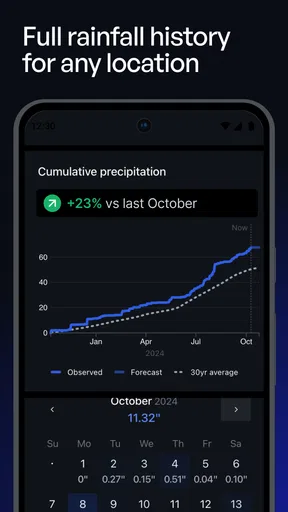
- Detailed precipitation forecasts.
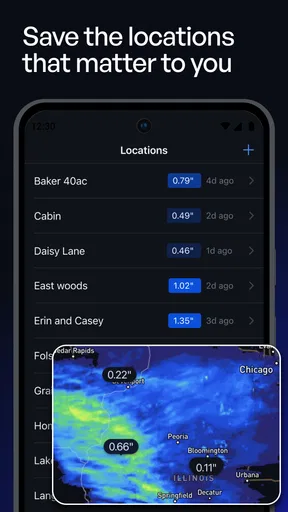
- Supports multiple locations for tracking.
Limitations of Precip – Rain Totals & Weather
- May drain battery quickly.
- Limited offline functionality.
- Occasional ads can be intrusive.
- Requires GPS for precise data.
- Some features need premium access.
Similar Picks in This Category
View All
Weather - By Xiaomi
Xiaomi Inc.4.1

Weather & Radar Forecast
WetterOnline4.8

Weather
OneLouder Apps4.6

AccuWeather: Weather Radar
AccuWeather3.6

The Weather Channel - Radar
The Weather Channel4.6

1Weather Forecasts & Radar
OneLouder Apps4.3
Frequently Asked Questions
What features does Precip offer for weather tracking?
Precip provides real-time weather updates, including detailed forecasts for rain, snow, and other weather conditions. It offers interactive maps, severe weather alerts, and customizable notifications to keep you informed. The app also includes a user-friendly interface with options to view hourly and weekly forecasts.
Is Precip available on both Android and iOS devices?
Yes, Precip is available for download on both Android and iOS platforms. Users can find it on the Google Play Store for Android devices and the Apple App Store for iOS devices, ensuring a broad range of compatibility across smartphones and tablets.
Does Precip require an internet connection to function?
While Precip can provide some basic functionality offline, such as previously loaded forecasts, an active internet connection is necessary for real-time updates, interactive maps, and receiving the latest weather alerts. It is recommended to have a stable connection for the best experience.
Are there any in-app purchases or subscriptions in Precip?
Precip offers a free version with essential features, but it may also include in-app purchases or subscription options for advanced features, such as ad removal, detailed radar maps, and premium weather alerts. Users can choose to upgrade based on their needs.
How accurate are the weather forecasts provided by Precip?
Precip uses data from reputable meteorological sources to provide accurate weather forecasts. While no weather app can guarantee 100% accuracy due to the unpredictable nature of weather, Precip is designed to offer reliable forecasts to help users plan their activities effectively.
